Showing posts with label applique. Show all posts

9/22/2016

My Road Home Quilt Row

I am happy to be able to reveal my row for The Road Home Row Along. 


What an undertaking! Marian of Seams To Be Sew and Amy of Sew Incredibly Crazy worked for many months organizing and scheduling the designers and then gathering sponsors. 40 designers, from all over the world, creating quilt rows representing HOME to each of them. Thanks and more thanks to both of you. And a big thank you to the many sponsors who have supplied the giveaways for the duration of this Row Along. The giveaways can be found below.

The link to my free row pattern is HERE. Read a little more to learn why I choose these representations for my Road Home.  

I have lived in Michigan my entire life. I was born, raised and attended college on the east side of the state, a very large metropolitan area. I moved to a rural area on the west side of Michigan, about 30 miles from the shores of Lake Michigan, when I began teaching. I have traveled throughout Michigan and have enjoyed making memories of the places I have gone. What I have especially appreciated is the flora and fauna that can be seen around the state. I chose to create appliques that represent some (I had to limit what I chose) of the wildlife I have seen as I travel to and from "home."

My row has appliques of a white-tailed deer, a green darner dragonfly, apple blossoms, a robin and dwarf lake iris--these are just some of the "state symbols" for Michigan. We see deer in our own backyard and are watchful when driving as they can run into or across the roads at any time. (Twice in my driving, I have had cars damaged when a deer jumped in front of me.) 

I live near and travel through The Ridge, the area where all kinds of fruits and vegetables are grown, especially apples (my favorite) so, I included the apple blossom, our state flower. 

Our state bird, the robin, migrates north and announces Spring's arrival as they eat and hop on lawns and build nests. I included the green darner dragonfly because they are found along and near much of Michigan's waterways darting about eating insects. 

The official state wildflower is the dwarf lake iris, which I have seen when traveling during the summer in the Upper Peninsula. It is a small, rare flower, that grows in low wet spots near beaches, not on them. It is "found only on the coastlines of northern Lake Michigan and northern and easter Lake Huron, a small site on the southern shore of Lake Superior, and a few isolated islands of the Great Lakes." 

The state motto is: if you are seeking a pleasant peninsula, look around you. The native Ojibwa people called this area mishigamaa  which means, "large water" or "large lake."The French named it Michigan. Michigan is surrounded by 4 of the 5 Great Lakes: Superior, Michigan, Huron, and Erie. Michigan is two peninsulas; one is shaped like a mitten.  In fact, when we show someone where we live, we point to a place on our hand. 


We can also show the upper and lower peninsulas with both our hands. When I was a kid, the car license plates were green and white and said, "Water Winter Wonderland" on them.

I have learned to appreciate all we have in Michigan and try my best to insure these wondeful flora and fauna are here for future generations. 

Thank you for visiting today. I hope you find a way to incorporate these appliques in one of your next quilting projects. I will respond to comments left (if you leave an email address) as soon as I can. I know there can be many.

Below are the Rafflecopter entries for the giveaways. And below those, the links to the other designers posting today and the following weeks. 


5/01/2016

Four-in-Art Quilt Challenge Reveal

Four-in-Art is a small group of quilters who hail from many different places. One member announces a yearly quilt theme. This year it's COLOR. A sub-theme was added to each quarter's challenge this year to spice it up. This quarter we had to work MUSIC into our projects. 

Visit the posts of all Four-in-Art members to see how each interpreted Color and Music for this May 1 reveal. Their links are at the bottom of my post. 


I will admit I know just a little about music (to perhaps be dangerous). As a college student studying elementary education I was required to take Music 101, where, in fact, we had to learn to play the piano in 16 one-hour sessions on our own! I was able to play songs written with only quarter notes in the chord of C. Period. 

I know enough about the treble cleff (I like drawing it), "Every Good Boy Does Fine," Do, Re, Me, "F-A-C-E," the counts given to various notes; but, I can't keep time, or rythm and my foot and my fingers don't work together. 


I enjoy listening to a variety of music. As an elementary teacher, I included lots of singing during classes. We had record players and then cassette players. I knew the songs by heart and children are pretty forgiving when the tune maybe not be spot on. I can sing some popular songs and am pretty sure I am flat or sharp where I shouldn't be. 


So where to begin with Color and Music?

Many ideas spun around in my head. I have told group members that I tend to be literal in interpretation on these projects (as I am with most of the quilts I make). 


I thought about a guitar applique after a quilting friend posted about the Gibson Guitar Company in Kalamazoo, Michigan. I even went so far as to draw a guitar in EQ7. 


Another idea was constructing the staff with black and white fabric and uappliqueing the notes in various colors. 


Then!  Out of the blue the idea came to me!

RAIN 

It was a rainy spring day. 

I thought of the song, "It's Raining, It's Pouring," then the Carpenters', "Rainy Days and Mondays," "Raindrops Keep Fallin' on My Head," and Gene Kelly "Singin' in the Rain." 

Well, you get the idea. An internet search indicated there are over 775 songs about rain!


The songs were popping up like mushrooms after a rain. (And that really does happen.)

RAIN would make the music. "Rain Songs" was conceived.
Blue, the color every kid uses to show water (well, there are exceptions). I had a fat quarter pack of fabrics by Anthology ranging from lights to dark (or maybe the other way around). I needed one other fabric because I thought the lightest two would be lost in the layout. I am still learning about tint and shade. I would say that these blues are tints as they get lighter, which would indicate white being added. If black were added I don't think the darkest blue would have the brightness it does. Therefore, shades are not involved in the raindrops.
I applied fusible to the back of 6" x 4" pieces of only 8 of the fabrics. Each color would represent one of the notes on the C scale, or as I remember: Do, Re, Me, Fa, So, La, Ti, Do.

Rain comes during darker weather with grey skies. Five shades of grey would be used to represent the five lines of the staff. I made wavy cuts to indicate the movement of the rain clouds. The different colors show different types of rain, light rain with soft sounds and heavy rain with thunderous downpours. Each raindrop would represent a whole note. The darker the color the lower the note. The lighter the color, the higher the note.

I divided the quilt top into sections. Twelve vertical lines would allow four whole notes to be placed in 3 measures across. 

I drew horizontal lines indicating the lines and spaces of the staff. Each raindrop note would be appliqued to its corresponding place on the staff.

There are actually three Rain Songs on this piece. The rain song on the top is a softer song, higher notes indicated by the lighter blues. The rain is softer, the storm not so strong.

The middle rain song is soft and light to begin then it becomes lower, deeper with the darker or lower notes. High notes to low notes as the grey skies deepen in shade.

The last rain song is a heavy storm, deep grey shades and dark, low notes. The storm lets up a bit, then begins to lower in sound. 

I quilted verticle lines showing the falling rain. The rings indicate the raindrops are hitting the ground, or something, making sound, vibrating outward to our ears. 
 And the back of the quilt with label attached.

The other Four-in-Art Reveals:

We also have a blog, Four-in-Art Quilts, where you can find us all.
Betty         https://www.flickr.com/photos/toot2
Janine         http://www.rainbowhare.com
Simon         http://quiltalicious.blogspot.com
Susan         http://patchworknplay.blogspot.com


10/25/2013

Blog Hopping Ends Today

Today is the final day of the Autumn Applique Animal Blog Hop. I am sad to have it end because I have seen and learned new things from the bloggers. I am so impressed by the work and ideas shown in these blogs. Thanks again to Electric Quilt and Beaquilter.com

For those of you who commented so positively on my tutorial, thank you. I didn't want to make it too long or boring, but I wanted you to be able to replicate the apple and try something that was, maybe, new.

Bea didn't know it until I told her today, but I did not use the EQ PatchDraw Block worktable (applique) until I joined her April 2013 blog hop. I always designed pieced blocks using EQ's EasyDraw Blocks. I never thought I could design applique patterns. I have learned quite a bit through the blogs. 

So, here is the silly character I designed using a gooseneck gourd that I had seen in a seed catalog. I did not copy the photo. I just tried to draw its shape the best I could. I knew I could grab the bezier points and shape the objects the way I wanted. So here it is. Maybe not yet completed, in fact, I think I need to get into the motif worktables and see if I can add more detail to it from there. Maybe a leaf for an arm?


If you have not been to all the blogs, here they are and below the list is information about the Giveaway! 

October 21st

October 22nd

October 23rd

October 24th

October 25th
Visit Carol and "EQ Mouse" and leave them a comment as entry into the EQ7 Program giveaway. 

Those who leave a comment on my blog today, telling me which of my applique designs you could possibly use in a project, are entered into MY giveaway--this great bundle of fat quarters.  I will announce my giveaway winner on October 28.

I will mail this fat quarter bundle within the U.S. If someone outside the U.S. wins, I have a collection of PDF patterns I have designed to email to you.
I must have a way to contact you. If you are a no-reply blogger, or do not have a blog, you must leave your email address in the comment. If I can't contact you, I will not be able to include you in the drawing. I do not accept anonymous comments. They go into my spam file! I will leave this contest open until 11:59 EST on October 25, 2013. 

Have fun with your quilting designs. And always feel free to share them with me. I would like to see what others are designing.


10/24/2013

Applique Apple Tutorial

Hello. Thank you for stopping.

Today is my scheduled day to post an EQ7 drawing tutorial for the Autumn Applique Animal Blog Hop. First, I want to thank Bea of beaquilter.com for inviting me to once again participate in one of her blog hops. They are always fun. 

And a big thank you to Electric Quilt for sponsoring this blog hop. They have a Great Giveaway for one lucky blog hopper. You will find the details after the tutorial.

I will show you how I designed this cute green apple. 
I must tell you that I save each step of my drawing in the Sketchbook as I go. It insures that if my computer has a hiccup I don't lose any work. PLUS, I can get back to something I liked (or didn't) and move the design in a different direction.


Open EQ7, click on Block>New Block> Easy Draw + Patch Draw at the top of the worktable. Click the appliqué tab at the bottom of the screen.


I want to draw a heart using the Drawing Toolbar. My toolbar shows a circle. If I click on the tiny triangle in the top corner of the Oval Tool button, a pop out menu shows and I click on the Heart shape.


I draw a heart and will make it a bit wider and change the shape a bit to look like an apple. 


To make changes, I select the Pick tool button--the arrow at the top of the Drawing Toolbar.


I want to turn the heart just slightly to the left. This Angle of Rotation box allows me to enter a number. An arrow shows that the angle of rotation turns clockwise. Since I want the apple to rotate to the left, I use a larger number.  Play around with this tool and see what happens. 


To change the point of the heart shape, I select the Shape tool button (circled in red). Then click on the point of the heart. A square, black node appears. There are two blue lines coming out from this node. 


I work with one side at a time. I click and hold onto one of the little, square, open boxes at the end of one blue line and move it down to the bottom of the worktable. I repeat for the other blue line. The shape of the heart changes and looks more like an apple.


I add a stem by selecting the Line Tool (green arrow) and connecting the ends of the lines. Since I drew the stem after the apple, the EQ automatically places the stem in front of the apple. I want to position it behind the apple, so I select the stem and then click on the send to back button (red arrow). 


Leaves are next (looks a bit like hair to me). I use the Oval tool again; but it is a heart and I want leaf shapes. So I click the tiny black triangle again and select a leaf shape. I draw one. 
To make the other leaf, I click Edit on the top taskbar and select Copy. Then I select Edit again and click on Paste. (You could, instead, use CTRL + C to copy, then CTRL + V for paste.)


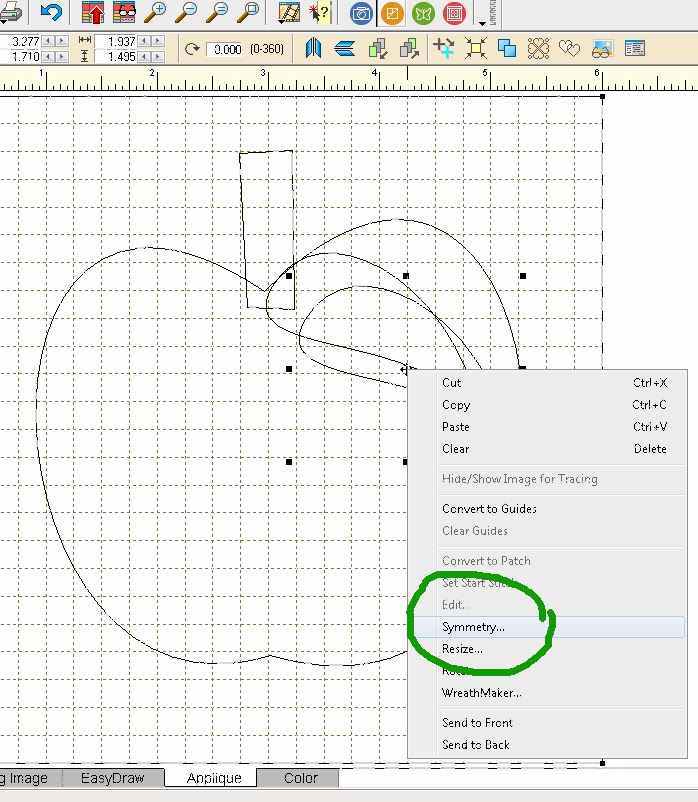
I have a second leaf, but it is facing in the wrong direction. While that pasted leaf is selected, I right click on it and a box appears. I want to click on Symmetry...


When I do, this little symmetry box appears. 


I click on Flip H (Horizontal) and the leaf is facing the other way. I move it to the position I want, on the other side of the stem. 


There is another way to Flip.  Use the button shown at the top (green circle).


Now it needs the eyes. I draw a circle. By holding the CTRL key while I draw it, a perfectly formed circle is made. (I release the CTRL key before I release the mouse.) I draw a smaller circle inside that circle. I select both circles by holding the shift key as I click first on the small circle and then click on the large circle. I copy and paste, so I have two eyes. 


I can flip the eyes horizontally or vertically if I want to get sillier looks, or whatever.
I finally want a smile before I color this apple. 


I use the Bezier Curve tool (green arrow above). I draw one arc for the bottom of the smile. Stop while holding the mouse button (like putting the needle down and pivoting with the sewing machine) and then draw another curve off that end point to the point where the first arc began.

And finally I select the Color tab at the bottom of the Worktable and color the applique. 

I hope this tutorial was helpful. 

Leave a comment on my blog. It counts as an entry into the BIG Giveaway from EQ. Visit the other blogs listed below and your is another entry. This giveaway is now closed.

 From the combined comments of all the blogs, ONE lucky person will be chosen on November 1. The winner will be picked by random.org 


But That Is Not All!


I have my own special giveaway for ONE lucky person! In keeping with the Autumn theme: this lovely bundle of fat quarters.

I will mail this fat quarter bundle within the U.S. If someone outside the U.S. wins, I have a collection of PDF patterns I have designed to email to you.

To Enter My Giveaway: 
Your comment on my blog will count as one of the entries for the EQ7 program giveaway. PLUS, I will count it as an entry for my giveaway. 

Earn a second entry for my giveaway by returning here on October 25 and leaving a comment telling me which of my applique designs you could possibly use in a project. I will announce my giveaway winner on October 28. 

I must have a way to contact you. If you are a no-reply blogger, or do not have a blog, you must leave your email address in the comment. If I can't contact you, I will not be able to include you in the drawing. I do not accept anonymous comments. They go into my spam file! I will leave this contest open until 11:59 EST on October 25, 2013.  

Please return tomorrow to see the final applique I designed and to find out what other projects I have to share with you.

Here is the schedule of bloggers:

October 21st

October 22nd

October 23rd

October 24th

October 25th


10/20/2013

2013 Autumn Animal Blog Hop Begins


Today begins the Autumn Animal Blog Hop 
hosted by Bea Lee from Beaquilter. 
The schedule is as follows: 

October 21st

October 22nd

October 23rd

October 24th

October 25th

We each have used EQ7 to design an applique of an autumn animal, or something related to the season. I know Bea likes to design things with big eyes, so I designed some appliques with big eyes. 

My tutorial reveal will be on October 24; but I thought that each day, up until then, I would post the other designs I came up with.

So, today I will show you my turkey. I do not have a detailed tutorial for this design, but maybe you will be able to do something like this. 


And, if you don't have an EQ7 program to use, we have an announcement:

Electric Quilt Company is sponsoring this hop and is giving away ONE full version of the EQ 7 program ($189 value) to ONE lucky person.  It is easy to enter! 

Just comment on the featured blog(s) each day. From the combined comments of all the blogs, ONE lucky person will be chosen on November 1. The winner will be picked by random.org    

Now, I have my own special giveaway for ONE lucky person! In keeping with the Autumn theme: this lovely bundle of fat quarters.


I will mail this fat quarter bundle within the U.S. If someone outside the U.S. wins, I have a collection of PDF patterns I have designed to email to you.

You wonder how to enter? 
On October 24, my featured day, your comment will count as one of the entries for the EQ7 program giveaway. 
PLUS, I will count it as an entry for my giveaway. You can earn a second entry for my giveaway by returning here on October 25 and leaving a comment telling me which of my applique designs you could possibly use in a project. I will announce my giveaway winner on October 28. 
But, I must have a way to contact you. If you are a no-reply blogger, or do not have a blog, you must leave your email address in the comment. If I can't contact you, I will not be able to include you in the drawing. I do not accept anonymous comments. They go into my spam file! I will leave this contest open until 11:59 EST on October 25, 2013.  

Come back to see the next applique reveal tomorrow.